Features
Chiropractic software built around the work your team needs to finish.
Start with the problem slowing down your day. Explore how Cervica connects patient preparation, documentation, billing and follow-up, with review where your team needs it.
Features vary by plan. Automations depend on configuration and connected services. Compare plans and setup costs.
Work organized by role
Less searching for what needs attention
When work lives across charts, messages and billing screens, the next step can be easy to miss. For You brings relevant queues together for providers, front desk, billers and managers. Expand a count, inspect the item and open its workflow.
Providers can find drafts and co-sign work. Front desk can work replies and missing information. Billers can review claims and remittances needing attention. Role permissions determine access.
See your team’s workflow in a demo →Billing & revenue
Move claims forward and focus on billing exceptions
A completed visit should not require someone to reconstruct the billing. Signed notes can generate claims; eligible clean drafts move toward scheduled submission after a review window. Held claims and scrub errors remain for staff action.
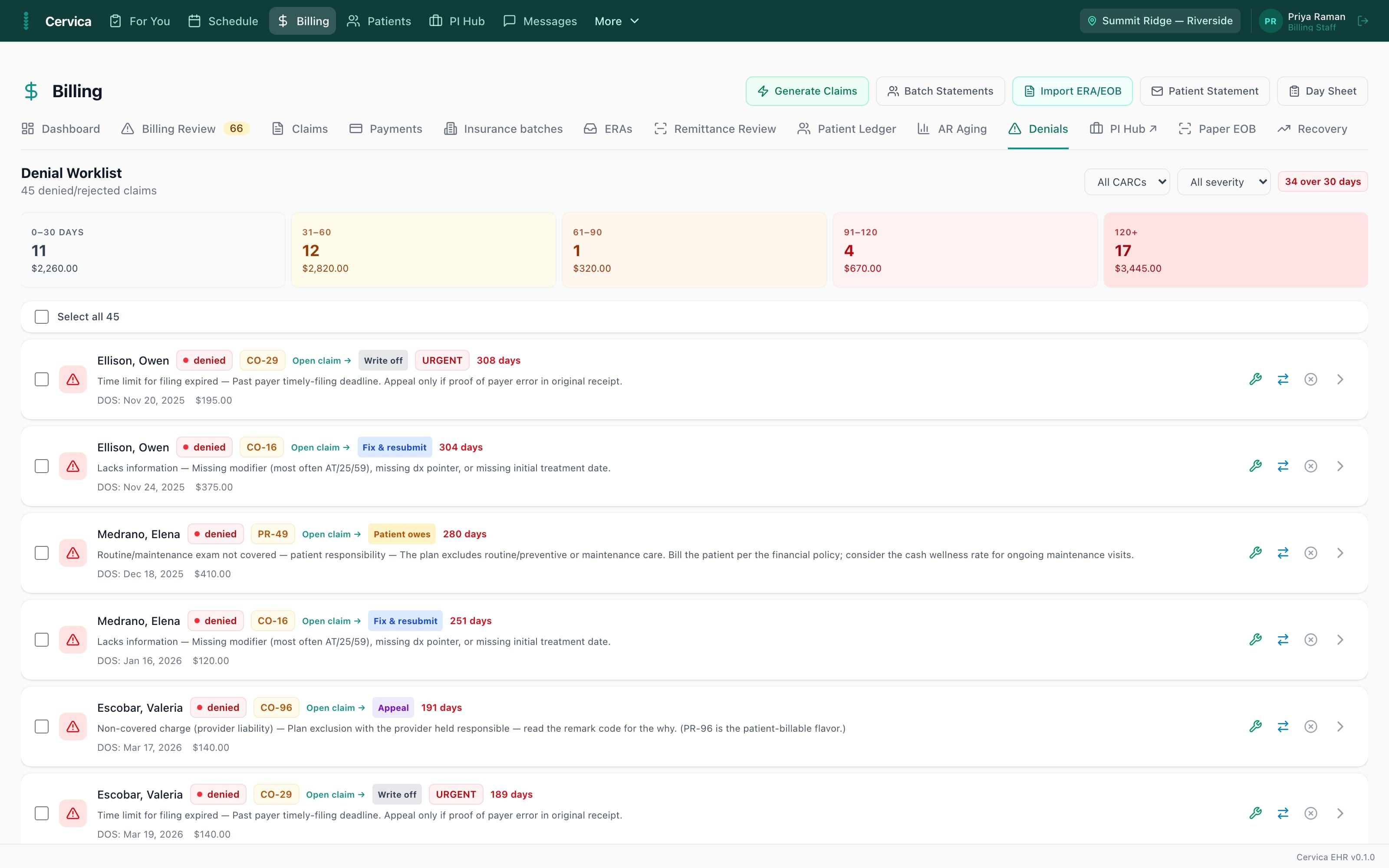
- ✓Electronic claims with pre submission scrubbing that blocks known rejection causes
- ✓Automatic ERA retrieval and claim matching when connected, followed by biller review and posting
- ✓Plain-English denial explanations and suggested next steps for biller review
- ✓AI appeal drafts based on claim information for your team to review, on Practice + AI and above
- ✓Scheduled eligibility refreshes for supported payers before upcoming visits, with coverage-change alerts
- ✓Payer payment learning uses historical remittances to inform estimates, on Practice + AI and above
- ✓Patient statements, payment plans with stored card auto charge, terminal and text to pay
Documentation
Document today’s care with the relevant context in reach
Repeated entry and unfinished notes can stretch the working day. Review prior context, capture today’s changes and inspect the rendered note before signing. Documentation queues help surface what remains unfinished.
- ✓Macro driven SOAP notes with structured exam dialogs and a spine diagram your findings live on
- ✓Prior visit context to review and update for today’s findings
- ✓Initial, daily, re exam, and discharge visit types with the right structure for each
- ✓Medicare guardrails: maintenance care warnings, ABN capture, re exam gates, documentation checks before signing
- ✓AI narrative drafting from your own findings, and code suggestions you approve, never auto applied
- ✓Ambient dictation in beta, on Practice + AI and above
- ✓Outcome measures with scoring built in
Scheduling
Prepare the day and arrange the next visit
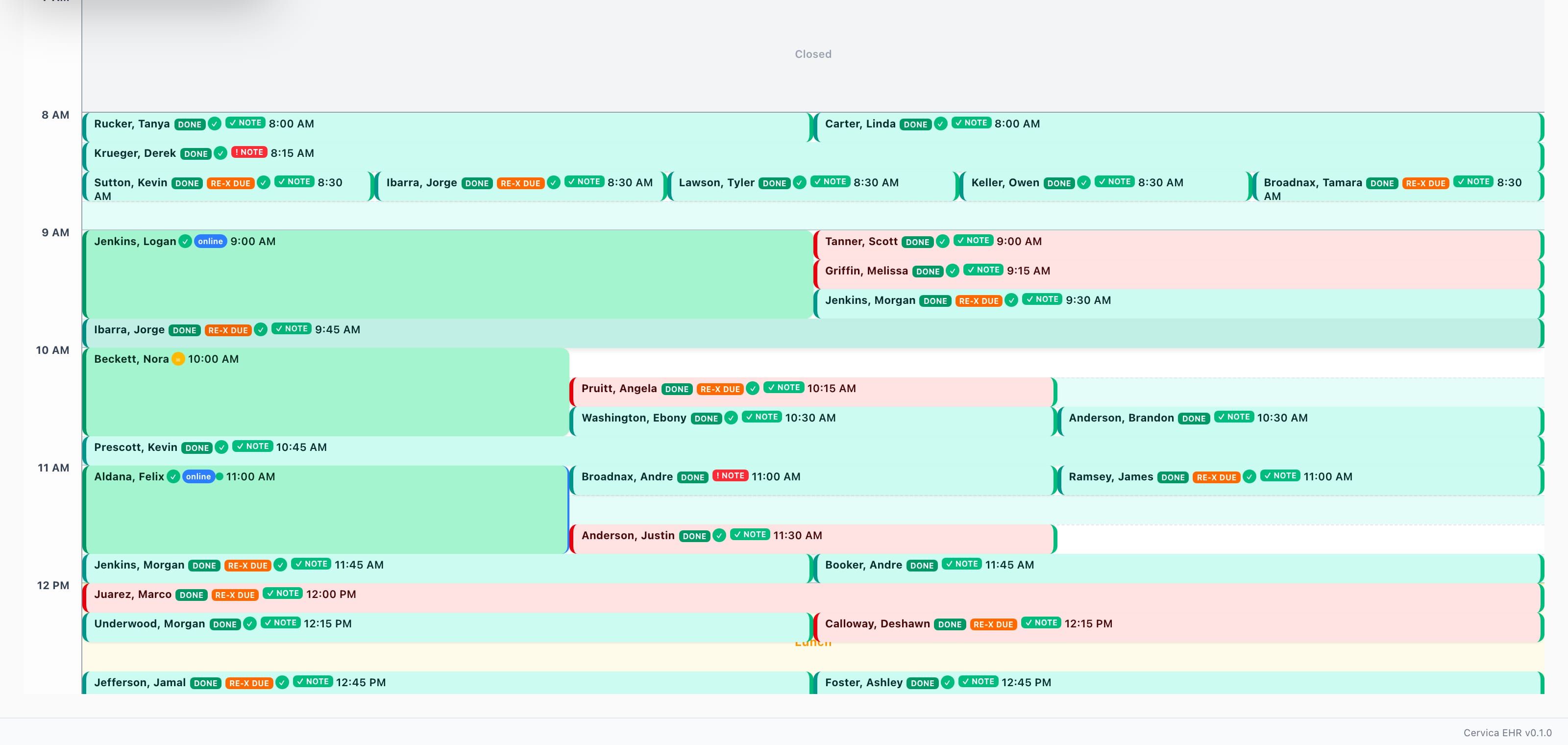
- ✓Multi location schedule with recurring visits and conflict checks
- ✓Note status on every appointment, so unsigned documentation is visible from the schedule itself
- ✓Online booking that matches to existing charts instead of creating duplicates
- ✓Provider schedules, time off, and room and resource management built in
Texting & reminders
Keep patient follow-up connected to the schedule
A reminder helps with an appointment already booked. Reactivation helps find eligible patients who no longer have one. Work detected follow-up, enable optional staged outreach and arrange a suitable return visit.
- ✓Text from the schedule patient panel and retain context when arranging the next visit
- ✓Recognized confirmation replies update appointment status; reschedule requests go to staff for follow-up
- ✓Two way texting from a dedicated number per office, never metered
- ✓Appointment reminders and confirmations by text and email, with delivery you can verify
- ✓Text to pay links on statements and balances
- ✓Conversations live in one inbox tied to the chart, not on a personal cell phone
Intake, forms & kiosk
Help patients complete paperwork before arrival
Reduce the need to prepare and resend routine paperwork links. New-patient intake reminders can prompt eligible patients with incomplete intake before the appointment.
- ✓Digital intake with conditional questions in English and Spanish, with history available for clinical review
- ✓Kiosk check in at the front desk, so arrivals mark themselves
- ✓Patient forms with e signature, dispatched automatically by visit type
- ✓Document requests with a patient upload portal
Imaging
X-rays where the chart is
- ✓X-ray viewing with annotation tools, right inside the patient record
- ✓Radiology reports attached to the study, not lost in a documents folder
- ✓Imaging embeds into records packages, so attorney and referral packets include the films
Reporting
Numbers you run the practice on
- ✓Role based dashboards: the owner sees the practice, each staff role sees its own day
- ✓For You queues tailored to role, with items that open into the relevant workflow
- ✓Collections, visits, and new patient pacing per location, side by side
- ✓AR aging, payer summaries, denial analytics, and provider productivity